- Using native Android USB Host API - kind of libusb within Android.
- USB Host for Nook Simple Touch Reader
- ELLCC - Project to bring decent cross-compiling support to LLVM (currently cross-compiling is rather neglected by LLVM mainline)
- Blueman - GTK+ Bluetooth Manager
- hidclient - Forward local input devices via Bluetooth HIDP
- Using the PlayStation 3 controller in Bluetooth mode with Linux - This is about "Sixaxis" game controller, not BD Remote, but confirms that PS3 likes adhoc pairing stuff instead of true Bluetooth one.
Monday, August 13, 2012
Links for August 2012


Wednesday, July 4, 2012
TI Launchpad 1.4 vs 1.5 pin swappery
Everyone knows that AVR is the king of open-hardware/hobbyist hill, as well as one of the most available MCU family, with most popular MCUs easily sourceable around the world in the nearest half-decent electronic component shop/martetplace. Why would you want to swap Arduino-thingy for something else? Many factors would need to play for that to happen, like price, availability again, and some issues with AVR.
Texas Instruments with Launchpad devel board for MSP430 value line pushes edge on price and availability, shipping candy to almost any country in the world for unbelievable price. And one of the issue I had with AVR MCU is inconsistency in their implementation (pin and register maps), which complicates MCU upgrade and code portability among the models.
So, MSP430 delivered with Launchpad felt like fresh air, and overall pretty cleverly and attentively designed MCU. Well, as folks who watch that space know, TI replaces the original Launchpad 1.4 model which shipped with MSP430G2231 with 1.5, shipping with MSP430G2553, without changing the price, which felt like generous move, and their desire to become real Arduino competetor.
Well, one of the issue which came with 1.5 was that it turns out that MSP430G2553 uses swapped assignment of RXD & TXD pins in its hardware UART comparing to (completely software-based) UART implementation with MSP430G2231. That could raise some eyebrows: because 1) couldn't Launchpad designers be attentive and design it originally as being compatible with entire MSP430G family (i.e. use hardware UART pin assignment right away); 2) if it really happens that MSP430G2553 was designed after Launchpad 1.4, couldn't TI engineers be so attentive to be compatible with existing UART pin assignment in their advertisement product, based on which quite a few people may judge entire MSP430 family.
But OK, stuff happens. TI was kind enough to provide a workaround to swap pins using a jumper trick. And well, you mostly use UART to communicate with "big" computer, so that jumper there was the only thing need.
And few days ago I ported my code to communicate with an SPI device (using a shield) from G2231 to G2553. First issue is that former vs latter use completely different SPI (etc.) communication controllers - USI vs USCI (yup, could have been named clearly to emphasize their difference). So, I was hit by the same issue I blamed on AVR - well, there at least if there's SPI controller, it works the same, even if some register addresses/bits might be different.
But once I ported software, I still couldn't get my device working, and it took few hours to check thru datasheets and manuals to find out that G2231 vs G2553 have also MOSI vs MISO pins swapped! Now, that's something to really frown about. It's not some random software-emulated UART pins misplaced on G2231 and corrected on G2553. In case of SPI, both MCUs have hardware SPI, so swapping pins is just that - big unfriendly "surprise" delivered in hardware developer's face. It would be too naive to think that it again happened by accident or mistake - conspiracy theorist would say it was carefully managemented and engineered incompatibility within family, designed to make users keep buying old low-power stuff and disallow easier upgrades. It's pure wonder they didn't get an idea to swap VCC and GND - indeed why not, few hundreds/thousands MCUs/devices burnt, and happy customers come back to buy more.
Aftermath of SPI swap is actually more serious than UART swap - again, UART is mostly used to connect to host, so you can set needed jumper position on it and forget (scalable solution is to keep using software UART and original pin assignment, as hardware UART is absent on quite a few devices and Launchpad is limited to 9600 baud anyway). But SPI is peripheral interface and the whole idea of Arduino and which TI also seems to push to Launchpad is extension modules aka shields. And SPI swappery means if you "just" make a shield for SPI device, it won't compatible with either old or new device (on hardware level). Would be pretty serious issue for folks who try to support Launchpad ecosystem, but surprisingly I found only one post on the issue, which again, means that folks are not aware, and unhappy customers may follow.
So, it's hard to say if TI should be blamed or vice-versa, thanked for being fare and show with Launchpad not only boons, but also drawbacks of MSP430 family. What's important are lessons learned (not just with this case, but with few other Launchpad hiccups):
Texas Instruments with Launchpad devel board for MSP430 value line pushes edge on price and availability, shipping candy to almost any country in the world for unbelievable price. And one of the issue I had with AVR MCU is inconsistency in their implementation (pin and register maps), which complicates MCU upgrade and code portability among the models.
So, MSP430 delivered with Launchpad felt like fresh air, and overall pretty cleverly and attentively designed MCU. Well, as folks who watch that space know, TI replaces the original Launchpad 1.4 model which shipped with MSP430G2231 with 1.5, shipping with MSP430G2553, without changing the price, which felt like generous move, and their desire to become real Arduino competetor.
Well, one of the issue which came with 1.5 was that it turns out that MSP430G2553 uses swapped assignment of RXD & TXD pins in its hardware UART comparing to (completely software-based) UART implementation with MSP430G2231. That could raise some eyebrows: because 1) couldn't Launchpad designers be attentive and design it originally as being compatible with entire MSP430G family (i.e. use hardware UART pin assignment right away); 2) if it really happens that MSP430G2553 was designed after Launchpad 1.4, couldn't TI engineers be so attentive to be compatible with existing UART pin assignment in their advertisement product, based on which quite a few people may judge entire MSP430 family.
But OK, stuff happens. TI was kind enough to provide a workaround to swap pins using a jumper trick. And well, you mostly use UART to communicate with "big" computer, so that jumper there was the only thing need.
And few days ago I ported my code to communicate with an SPI device (using a shield) from G2231 to G2553. First issue is that former vs latter use completely different SPI (etc.) communication controllers - USI vs USCI (yup, could have been named clearly to emphasize their difference). So, I was hit by the same issue I blamed on AVR - well, there at least if there's SPI controller, it works the same, even if some register addresses/bits might be different.
But once I ported software, I still couldn't get my device working, and it took few hours to check thru datasheets and manuals to find out that G2231 vs G2553 have also MOSI vs MISO pins swapped! Now, that's something to really frown about. It's not some random software-emulated UART pins misplaced on G2231 and corrected on G2553. In case of SPI, both MCUs have hardware SPI, so swapping pins is just that - big unfriendly "surprise" delivered in hardware developer's face. It would be too naive to think that it again happened by accident or mistake - conspiracy theorist would say it was carefully managemented and engineered incompatibility within family, designed to make users keep buying old low-power stuff and disallow easier upgrades. It's pure wonder they didn't get an idea to swap VCC and GND - indeed why not, few hundreds/thousands MCUs/devices burnt, and happy customers come back to buy more.
Aftermath of SPI swap is actually more serious than UART swap - again, UART is mostly used to connect to host, so you can set needed jumper position on it and forget (scalable solution is to keep using software UART and original pin assignment, as hardware UART is absent on quite a few devices and Launchpad is limited to 9600 baud anyway). But SPI is peripheral interface and the whole idea of Arduino and which TI also seems to push to Launchpad is extension modules aka shields. And SPI swappery means if you "just" make a shield for SPI device, it won't compatible with either old or new device (on hardware level). Would be pretty serious issue for folks who try to support Launchpad ecosystem, but surprisingly I found only one post on the issue, which again, means that folks are not aware, and unhappy customers may follow.
So, it's hard to say if TI should be blamed or vice-versa, thanked for being fare and show with Launchpad not only boons, but also drawbacks of MSP430 family. What's important are lessons learned (not just with this case, but with few other Launchpad hiccups):
- Launchpad is not an Arduino.
- Launchpad will not be an Arduino.
- If you want nicely-working and user-friendly devel board, Arduino is always there.
- If you want something cheap, Launchpad so far there too.
- Expect Launchpad to bring issues and surprises, and break with new versions (ultimately, its price may break).
- MSP430 is unlikely to displace AVR.
- If you want to try MS430, check its availability. For example, in this part of the world, it's not possible to source small quantities of MSP430 value line, because well, nobody will get an idea to replace trusty ATtiny, so it makes no sense to bring them to shops. And nobody would get an idea to replace ATtiny because:
- "Didn't break - didn't fix it." If ATtiny can do it, why bother with something else. That's not just inertness of thought, which industry/experienced people possess, that's actually proved by experience, as we saw. To change that, new product should do it much better than existing, but MSP430 doesn't want to do that.
Saturday, June 23, 2012
KiCAD the schematic/PCB design suite
As many folks who start with hobby electronics design, I started with Eagle, because that's what most of other folks seem to use. I was able to produce a simple board, but fairly speaking, I have mixed feelings about it - both UI, structure, and functionality could be better.
I didn't try KiCAD right away because I read lot of (apparently old, or FUDish) notes that it lacks basic features, unstable, and complicated. I finally got to try fairly recent version of KiCAD and was astonished how logical, fairly easy to use, and well-performing it is. Yes, it is still could do better, for example, it's hard to understand what precludes to use direct manipulation GUI, where you can drag an object with ... dragging an object with mouse, but at least commands for manipulation are standard, complete, and available via context menu. So, doubts off, KiCAD should be *the* toolkit for Open Hardware.
So, what are the outstanding features of KiCAD?
Of course, its standard library contains all/most discrete components. Next, for infinite number of ICs, you don't need to draw each of them in all possible and impossible packages - there's finite number of packages, KiCAD already has great selection of, and you can create missing once and reuse it for new chips very easily. Secondly, a schematic symbol for a chip is a rectangle with pins sticking out of it, so to "create" a new chip, only pin names needed, the rest can be easily scripted thanks to text-based format (and there're existing tools, albeit they don't seem to be open-source).
Now few notes about installing. Current version of Ubuntu ship rather old (one-year as of writing) version of KiCAD, only upcoming Quantal ships (as of now) 0.20120526+bzr3261-1, and that's what I downloaded and installed manually on Precise (12.04) without any issues. There's also daily builds from trunk, and that's what I'm going to try next, just wanted to start from a known stable reference. So far, I had one crash with 0.20120526+bzr3261-1, without any adverse effects.
Don't forget to install package kicad-doc-en. Unfortunately, Quantal's version still includes older version of tutorial, you need latest version called "Getting_Started_in_KiCad.pdf", you can find it here. Following the tutorial will give you complete walkthru of KiCAD workflow, enough to produce your boards, including custom components.
I didn't try KiCAD right away because I read lot of (apparently old, or FUDish) notes that it lacks basic features, unstable, and complicated. I finally got to try fairly recent version of KiCAD and was astonished how logical, fairly easy to use, and well-performing it is. Yes, it is still could do better, for example, it's hard to understand what precludes to use direct manipulation GUI, where you can drag an object with ... dragging an object with mouse, but at least commands for manipulation are standard, complete, and available via context menu. So, doubts off, KiCAD should be *the* toolkit for Open Hardware.
So, what are the outstanding features of KiCAD?
- Separation of schematic symbol vs PCB footprint - they are not linked in the component library, but instead are linked as part of PCB design process
- Text-based formats for all files
Of course, its standard library contains all/most discrete components. Next, for infinite number of ICs, you don't need to draw each of them in all possible and impossible packages - there's finite number of packages, KiCAD already has great selection of, and you can create missing once and reuse it for new chips very easily. Secondly, a schematic symbol for a chip is a rectangle with pins sticking out of it, so to "create" a new chip, only pin names needed, the rest can be easily scripted thanks to text-based format (and there're existing tools, albeit they don't seem to be open-source).
Now few notes about installing. Current version of Ubuntu ship rather old (one-year as of writing) version of KiCAD, only upcoming Quantal ships (as of now) 0.20120526+bzr3261-1, and that's what I downloaded and installed manually on Precise (12.04) without any issues. There's also daily builds from trunk, and that's what I'm going to try next, just wanted to start from a known stable reference. So far, I had one crash with 0.20120526+bzr3261-1, without any adverse effects.
Don't forget to install package kicad-doc-en. Unfortunately, Quantal's version still includes older version of tutorial, you need latest version called "Getting_Started_in_KiCad.pdf", you can find it here. Following the tutorial will give you complete walkthru of KiCAD workflow, enough to produce your boards, including custom components.
Thursday, May 10, 2012
Solar cell types and their looks
Following cool solar experiments at jeelabs.org, I also got idea to attach something to a solar cell. But first, figure out what types of them exists and available. Regarding the first, you can read in Wikipedia. But that's example of dried-out wikipedia article, giving a lot of formal facts, but little practical knowledge. What I'd like to know is what types are typically available in small consumer products.
Here's what I researched. First type is brownish, with regular vertical or horizontal lines. It's the type of solar cell which have been see for at least 20 years in calculators. So, that's amorphous silicon solar cell, less expensive (explains why we had it for 20 years around) and less efficient, they say. But they also say that there're special subtypes, designed to work in low-light conditions (specifically, provide enough voltage, even though current may be miniscule). Here's how it typically looks:

Last years, another type became widely available in cheap stuff - crystalline silicon solar cells. In cheap stuff, they look like black (or dark) colored plate, covered with few millimeter of something like epoxy, in which you can clearly see metal wires - oftentimes in irregularly spaced groups. Looking closely, it can be seen that epoxy actually holds individual bars of crystalline silicon, and irregular spacing of builtin wires are in particular due to irregular cuts of these bars in the original wafer.
Here's close up:
 They say that crystalline is more efficient than amorphous, but more expensive. Explains why we started to see it around much later than amorphous. There's also mono-crystalline and poly-crystalline varieties, the first being more expensive, so my guess is that in cheap stuff we have poly-crystalline. It appears that small-size crystalline are rated for smaller voltage (2v) than an amorphous, which you can find for ~5V.
They also say that under dimmer lighting, crystalline cells provides reduced voltage.
Here's what I researched. First type is brownish, with regular vertical or horizontal lines. It's the type of solar cell which have been see for at least 20 years in calculators. So, that's amorphous silicon solar cell, less expensive (explains why we had it for 20 years around) and less efficient, they say. But they also say that there're special subtypes, designed to work in low-light conditions (specifically, provide enough voltage, even though current may be miniscule). Here's how it typically looks:
Last years, another type became widely available in cheap stuff - crystalline silicon solar cells. In cheap stuff, they look like black (or dark) colored plate, covered with few millimeter of something like epoxy, in which you can clearly see metal wires - oftentimes in irregularly spaced groups. Looking closely, it can be seen that epoxy actually holds individual bars of crystalline silicon, and irregular spacing of builtin wires are in particular due to irregular cuts of these bars in the original wafer.
Here's close up:

They also say that under dimmer lighting, crystalline cells provides reduced voltage.
Wednesday, May 9, 2012
"Arduino Hosted" Python Module
Here's what I've been hacking for some time now - a Python module which allows to run Arduino, etc. code on a host computer, while still allowing to access Arudino (etc.) hardware.
Of course, this is very obvious idea, so announcement of such project should proceed with explaining why yet another one? Two requirements I had was: using human readable/writable underlying protocol for communication with the board and being as much as possible compatible with original Arduino API/syntax. Regarding the latter, Arduino wiki's Interfacing/Python lists few modules which allow to control Arduino from Python, but you may find it amusing how they go out of their way to deviate from standard Arduino API (I saw as funky stuff as "board.digital[13].write(1)", but even the humblest has digital_write() instead of digitalWrite()). On the contrary, with Arduino Hosted, standard Blink example looks like:
from arduino import *
def setup():
pinMode(LED, OUTPUT)
def loop():
digitalWrite(LED, HIGH)
delay(1000)
digitalWrite(LED, LOW)
delay(1000)
arduino.run(globals())
That's pretty direct translation of C code (plus few idioms), and directly translatable back to C. And that's idea - you prototype and debug code in hosted environment, and then can easily translate it to native code (to keep debugging on, because latency of of hosted and native execution is quite different which hides/adds lots of timing issues).
Regarding the board communication protocol, I knew about BusPirate before that, and was really happy to find Joby Taffey's BusNinja implementation for Arduino. Even more, I found the implementation for TI Launchpad from the same author (Launchpad's version somehow named "SPI Explorer"). So, BusPirate's protocol with extensions is what I based on. Of course that doesn't too well, especially with TI Launchpad, which has particularly crippled UART support. Other issue is that BusPirate (even binary protocol version) supports working with only one bus at time. That's fine for BusPirate's original purpose, but limiting for a project like this (well, so far I didn't have to use I2C and SPI at the same time).
What about Firmata? First of all, it doesn't support SPI, and working with SPI devices was the immediate need behind implementing this module. Secondly... Well, there's a saying "If the only thing you know is a hammer, then any thing around looks like a nail." That's must have been the idea behind designing a MCU control protocol basing on MIDI protocol. NO WAI.
#!/usr/bin/env python
import arduino
arduino.init(debug=True)import arduino
from arduino import *
def setup():
pinMode(LED, OUTPUT)
def loop():
digitalWrite(LED, HIGH)
delay(1000)
digitalWrite(LED, LOW)
delay(1000)
arduino.run(globals())
That's pretty direct translation of C code (plus few idioms), and directly translatable back to C. And that's idea - you prototype and debug code in hosted environment, and then can easily translate it to native code (to keep debugging on, because latency of of hosted and native execution is quite different which hides/adds lots of timing issues).
Regarding the board communication protocol, I knew about BusPirate before that, and was really happy to find Joby Taffey's BusNinja implementation for Arduino. Even more, I found the implementation for TI Launchpad from the same author (Launchpad's version somehow named "SPI Explorer"). So, BusPirate's protocol with extensions is what I based on. Of course that doesn't too well, especially with TI Launchpad, which has particularly crippled UART support. Other issue is that BusPirate (even binary protocol version) supports working with only one bus at time. That's fine for BusPirate's original purpose, but limiting for a project like this (well, so far I didn't have to use I2C and SPI at the same time).
What about Firmata? First of all, it doesn't support SPI, and working with SPI devices was the immediate need behind implementing this module. Secondly... Well, there's a saying "If the only thing you know is a hammer, then any thing around looks like a nail." That's must have been the idea behind designing a MCU control protocol basing on MIDI protocol. NO WAI.
Monday, April 2, 2012
OpenSource Sensor Node firmware for BlueCore-based Bluetooth Modules
BlueCore4-Ext is a popular Bluetooth chip used in many Bluetooth modules, some priced below $10. The idea is to create Wireless Sensor/Control Network using this modules, as Bluetooth is really ubiquitous technology nowadays, so any smartphone can be used to provide user UI/control for such network. This is especially facilitated by the fact that BlueCore4-Ext is a SoC (system-on-chip) integrating microcontroller and peripherals in one package (small too), allowing it to be programmed with a user firmware for autonomous functioning with minimum of additional components. It even has built-in temperature sensor, so just add a battery and you have ready-made wireless temperature sensor (not too precise, granted, but you can calibrate it yourself ;-) ).
(Image by robocraft.ru)

BluTuNode is a firmware for such a Bluetooth Wireless Node, which allows to control it from a host over the air.
Source code: http://github.com/pfalcon/blutunode
Features implemented:
Appendix:
Some technical characteristics of BC4-based module:
SoC: BC417 (BC417143B full model ID)
CPU: XAP2+, 16-bit RISC (no special 8-bit data support), Harward architecture, 64Kword data space, 1Mword+ code space
Flash: 1Mbyte (512Kwords, 75% typically occupied by Bluetooth stack/OS)
RAM: 24Kword
Execution environment: Virtual machine, no native hardware access (later versions of firmware OS support "native" mode, heavily bounds-checked still).
(Image by robocraft.ru)
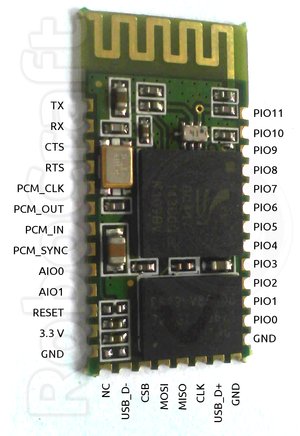
BluTuNode is a firmware for such a Bluetooth Wireless Node, which allows to control it from a host over the air.
Source code: http://github.com/pfalcon/blutunode
Features implemented:
- Full control of GPIO: input/output, configuring direction, pullups/pulldowns, etc.
- Reading sampled from build ADCs.
- Reading of temperature sensor.
- Querying other system parameters.
- Querying Bluetooth parameters.
- Poll mode, when module automatically reads some sensor at specified period and sends information to host.
- UART control (note that this is generally not a priority, because UART is mostly used to connect to host/microcontroller, and this firmware is designed for autonomous modules).
- SPI/I2C/1-wire support to connect external sensors.
- More Bluetooth-level information and control.
- OpenSource tools to program/manage BlueCore modules.
- Flash access/writing, over-the-air firmware updates.
Appendix:
Some technical characteristics of BC4-based module:
SoC: BC417 (BC417143B full model ID)
CPU: XAP2+, 16-bit RISC (no special 8-bit data support), Harward architecture, 64Kword data space, 1Mword+ code space
Flash: 1Mbyte (512Kwords, 75% typically occupied by Bluetooth stack/OS)
RAM: 24Kword
Execution environment: Virtual machine, no native hardware access (later versions of firmware OS support "native" mode, heavily bounds-checked still).
Thursday, March 29, 2012
Developing for TI LaunchPad MSP430 board on Ubuntu
If you google for it, you'll find quite a few blog posts, but most of them are from 2010. But starting with Ubuntu 11.10 (Oneiric), gcc-msp430 and friends are included in the main repositories, so you can just apt-get install them:
There's one annoying bug in Oneiric's version of binutils-msp430 which breaks build with -ffunction-sections -Wl,--gc-sections options (which is kinda common trick in embedded world to remove unused functions and reduce code size): mspgcc #3386145. It is fixed in Ubuntu 12.04 (Precise).
I'm however still running Maverick, so instead I downloaded following Oneiric packages:
Then few from Precise:
(If you try to install Precise versions of other packages on Maverick, they want to pull upgrades to system libs, which I wanted to avoid).
and installed them manually with dpkg.
apt-get install binutils-msp430 gcc-msp430 \
    msp430-libc msp430mcu mspdebug
There's one annoying bug in Oneiric's version of binutils-msp430 which breaks build with -ffunction-sections -Wl,--gc-sections options (which is kinda common trick in embedded world to remove unused functions and reduce code size): mspgcc #3386145. It is fixed in Ubuntu 12.04 (Precise).
I'm however still running Maverick, so instead I downloaded following Oneiric packages:
binutils-msp430_2.21~msp20110421-2_i386.deb
gcc-msp430_4.5.3~mspgcc-4.5.2-20110612-1_i386.deb
libgmp10_5.0.1+dfsg-7ubuntu2_i386.deb
libmpc2_0.9-3_i386.deb
msp430-libc_20110612-1_i386.deb
mspdebug_0.16-1_i386.deb
Then few from Precise:
binutils-msp430_2.22~msp20110716p5-1_i386.deb
msp430mcu_20110613-3_all.deb
(If you try to install Precise versions of other packages on Maverick, they want to pull upgrades to system libs, which I wanted to avoid).
and installed them manually with dpkg.
Subscribe to:
Posts (Atom)