- Using native Android USB Host API - kind of libusb within Android.
- USB Host for Nook Simple Touch Reader
- ELLCC - Project to bring decent cross-compiling support to LLVM (currently cross-compiling is rather neglected by LLVM mainline)
- Blueman - GTK+ Bluetooth Manager
- hidclient - Forward local input devices via Bluetooth HIDP
- Using the PlayStation 3 controller in Bluetooth mode with Linux - This is about "Sixaxis" game controller, not BD Remote, but confirms that PS3 likes adhoc pairing stuff instead of true Bluetooth one.
Showing posts with label bluetooth. Show all posts
Showing posts with label bluetooth. Show all posts
Monday, August 13, 2012
Links for August 2012


Monday, April 2, 2012
OpenSource Sensor Node firmware for BlueCore-based Bluetooth Modules
BlueCore4-Ext is a popular Bluetooth chip used in many Bluetooth modules, some priced below $10. The idea is to create Wireless Sensor/Control Network using this modules, as Bluetooth is really ubiquitous technology nowadays, so any smartphone can be used to provide user UI/control for such network. This is especially facilitated by the fact that BlueCore4-Ext is a SoC (system-on-chip) integrating microcontroller and peripherals in one package (small too), allowing it to be programmed with a user firmware for autonomous functioning with minimum of additional components. It even has built-in temperature sensor, so just add a battery and you have ready-made wireless temperature sensor (not too precise, granted, but you can calibrate it yourself ;-) ).
(Image by robocraft.ru)

BluTuNode is a firmware for such a Bluetooth Wireless Node, which allows to control it from a host over the air.
Source code: http://github.com/pfalcon/blutunode
Features implemented:
Appendix:
Some technical characteristics of BC4-based module:
SoC: BC417 (BC417143B full model ID)
CPU: XAP2+, 16-bit RISC (no special 8-bit data support), Harward architecture, 64Kword data space, 1Mword+ code space
Flash: 1Mbyte (512Kwords, 75% typically occupied by Bluetooth stack/OS)
RAM: 24Kword
Execution environment: Virtual machine, no native hardware access (later versions of firmware OS support "native" mode, heavily bounds-checked still).
(Image by robocraft.ru)
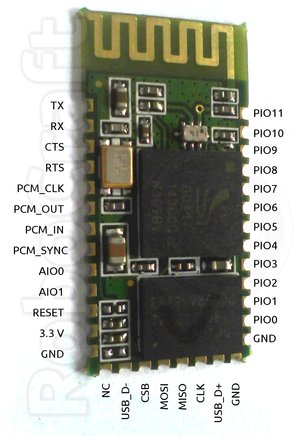
BluTuNode is a firmware for such a Bluetooth Wireless Node, which allows to control it from a host over the air.
Source code: http://github.com/pfalcon/blutunode
Features implemented:
- Full control of GPIO: input/output, configuring direction, pullups/pulldowns, etc.
- Reading sampled from build ADCs.
- Reading of temperature sensor.
- Querying other system parameters.
- Querying Bluetooth parameters.
- Poll mode, when module automatically reads some sensor at specified period and sends information to host.
- UART control (note that this is generally not a priority, because UART is mostly used to connect to host/microcontroller, and this firmware is designed for autonomous modules).
- SPI/I2C/1-wire support to connect external sensors.
- More Bluetooth-level information and control.
- OpenSource tools to program/manage BlueCore modules.
- Flash access/writing, over-the-air firmware updates.
Appendix:
Some technical characteristics of BC4-based module:
SoC: BC417 (BC417143B full model ID)
CPU: XAP2+, 16-bit RISC (no special 8-bit data support), Harward architecture, 64Kword data space, 1Mword+ code space
Flash: 1Mbyte (512Kwords, 75% typically occupied by Bluetooth stack/OS)
RAM: 24Kword
Execution environment: Virtual machine, no native hardware access (later versions of firmware OS support "native" mode, heavily bounds-checked still).
Sunday, January 29, 2012
HC-04 Bluetooth module and BlueCore4 Deep Sleep
The good news is that BlueCore indeed has Deep Sleep mode, it's not marketing hype. It can be verified by configuring PSKEY_CLOCK_REQUEST_ENABLE to drive PIO when chip uses/doesn't use external clock. The key here is not to keep PSTool run (which well, you need to tweak sleep settings).
The bad news is that an HC-04 module in Deep Sleep still consumes 2.5mA, which is far too high for anything called Deep Sleep. So, something on the module besides BlueCore still consumes too much power. However, when BlueCore is held in reset state, entire module consumes 0.
Without Deep Sleep, simple LED flash task consumes 3.5mA, so there's not that much gain from the Deep Sleep...
The bad news is that an HC-04 module in Deep Sleep still consumes 2.5mA, which is far too high for anything called Deep Sleep. So, something on the module besides BlueCore still consumes too much power. However, when BlueCore is held in reset state, entire module consumes 0.
Without Deep Sleep, simple LED flash task consumes 3.5mA, so there's not that much gain from the Deep Sleep...
Enabling SPI logging in BlueSuite tools CSR BlueCore chips
BlueFlashCmd.exe and other tools, part of CSR BlueSuite toolset to program BlueCore Bluetooth chips, has support for logging SPI communication with a chip. To enable it:
The key parameter here is SPIDEBUG_FILE - logging is activated when it's specified, and thus logging is always done to a file. One way to have logging go to a console is to use SPIDEBUG_FILE=con: , but then it won't be possible to redirect it.
Besides SPIDEBUG=ON, there're other logging levels/features:
Looking at the output produced, it turns out it spends a lot in calibrating SPI speed, a way to that down is to use SPISLOW=ON setting right away.
BlueFlashCmd.exe -trans "SPIDEBUG_FILE=spi.log SPIDEBUG=ON" -chipver
The key parameter here is SPIDEBUG_FILE - logging is activated when it's specified, and thus logging is always done to a file. One way to have logging go to a console is to use SPIDEBUG_FILE=con: , but then it won't be possible to redirect it.
Besides SPIDEBUG=ON, there're other logging levels/features:
- SPIDEBUG
- SPIDEBUG_REPRODUCIBLE
- SPIDEBUG_WRITES
- SPIDEBUG_READS
- SPIDEBUG_WIRE
Looking at the output produced, it turns out it spends a lot in calibrating SPI speed, a way to that down is to use SPISLOW=ON setting right away.
Saturday, January 7, 2012
Bluetooth Park Mode Exposed
So well, as I settled on Bluetooth as a wireless sensor/automation protocol and grow my device base, I started to wonder what will happen when I'll have more than 7 slave devices. Bluetooth stack of master device (Bluez in our case) must be smart to put devices into and out of PARK mode to allow to communicate with more than 7 devices, right? Not in this world.
Not only Bluez doesn't support park management, according to Marcel Holtmann, the problem is that it's really not known if there're devices (masters) which can support more than very limited number of slaves, or even have decent park mode implementation at all:
HC-04 Bluetooth module with CSR BlueCore4-Ext
< ACL 00:11:10:xx:xx:xx handle 12 state 8 lm MASTER
What we need here is a connection handle 12 (0x0c). hcitool doesn't have dedicated command for part mode (and for lot of other things), so we'll use raw HCI command mode using "cmd" command:
# hcitool cmd --help
Usage:
cmd <ogf> <ocf> [parameters]
Example:
cmd 0x03 0x0013 0x41 0x42 0x43 0x44
What's important here is that <parameters> should be byte values. If words should be given as parameters, they should be give by bytes in little-endian format.
Here we run HCI_Park_State(Connection_Handle=0x000c, Beacon_Max_Interval=0x0050, Beacon_Min_Interval=0x0040) command (see Bluetooth spec). And here's communication as captured by hcidump (parts irrelevant to park command omitted):
2012-01-07 15:36:46.084074 < HCI Command: Park State (0x02|0x0005) plen 6
handle 12 max 80 min 64
2012-01-07 15:36:46.086040 > HCI Event: Command Status (0x0f) plen 4
Park State (0x02|0x0005) status 0x00 ncmd 1
2012-01-07 15:36:46.271047 > HCI Event: Mode Change (0x14) plen 6
status 0x24 handle 12 mode 0x00 interval 0
Error: LMP PDU Not Allowed
This "LMP PDU Not Allowed" was quite confusing and took me lot of googling to figure out. Fortunately, I found insightful post from a CSR guy right on this matter: http://article.gmane.org/gmane.linux.bluez.devel/72
What we get here is that local Bluetooth master just forwards status it got from the remote device. As the message suggests, park might be disabled in remote device line policy. Let's see:
# hcitool cc 00:11:10:xx:xx:xx; hcitool lp 00:11:10:xx:xx:xx
Link policy settings: RSWITCH HOLD SNIFF PARK
Here's slight issue of what hcitool lp actually does. According to man, it "displays link policy settings for the connection to the device with Bluetooth address". There's also "hcitool lp" command which "Sets default link policy". So, reasonable assumption would be that every device may have default link policy, then during connection, they negotiate link policy which is suitable for the connection. Ok, let's set PARK policy explicitly:
But hcidump shows the the same "LMP PDU Not Allowed" error. So, what we have is that HC-04 module advertizes park support, it apparently negotiates its availability for connection, but when asked to actually perform it, it rejects it. This is so much correlates with this message: http://article.gmane.org/gmane.linux.bluez.user/12710
PS3 Bluetooth remote
So, this fair Broadcom device doesn't even conceal the fact that it's barely Bluetooth interoperatable - it doesn't support park state at all.
No surprises when asking it to go there nontheless:
2012-01-07 16:03:08.863586 < HCI Command: Park State (0x02|0x0005) plen 6
handle 13 max 80 min 64
2012-01-07 16:03:08.865636 > HCI Event: Command Status (0x0f) plen 4
Park State (0x02|0x0005) status 0x1a ncmd 1
Error: Unsupported Remote Feature / Unsupported LMP Feature
LG KS20 WindowsMobile phone
# hcitool info 00:1E:75:xx:xx:xx | grep park
<park state> <RSSI> <channel quality> <SCO link> <HV2 packets>
So, this one advertizes park. But:
2012-01-07 16:29:11.288514 < HCI Command: Park State (0x02|0x0005) plen 6
handle 12 max 80 min 64
2012-01-07 16:29:11.290485 > HCI Event: Command Status (0x0f) plen 4
Park State (0x02|0x0005) status 0x00 ncmd 1
2012-01-07 16:29:11.466508 > HCI Event: Mode Change (0x14) plen 6
status 0x0c handle 12 mode 0x00 interval 0
Error: Command Disallowed
Broadcom is such Broadcom...
Huawei U8160 aka Vodafone 858 Smart Android phone
# hcitool info 04:C0:6F:xx:xx:xx | grep park
Broadcom is such Broadcom...
HTC Mogul WindowsMobile phone
Bwahaha! TI rules!
Manufacturer: Cambridge Silicon Radio (10)
2012-01-07 17:54:17.141466 < HCI Command: Park State (0x02|0x0005) plen 6
handle 12 max 80 min 64
2012-01-07 17:54:17.142911 > HCI Event: Command Status (0x0f) plen 4
Park State (0x02|0x0005) status 0x00 ncmd 1
2012-01-07 17:54:17.472919 > HCI Event: Mode Change (0x14) plen 6
status 0x00 handle 12 mode 0x03 interval 80
Mode: Park
Park mode work here, supervised by Bluez.
So, out of 7 devices (that's whole piconet, and I have more!) only 3 supported park mode.
More insightful posts:
Not only Bluez doesn't support park management, according to Marcel Holtmann, the problem is that it's really not known if there're devices (masters) which can support more than very limited number of slaves, or even have decent park mode implementation at all:
- http://article.gmane.org/gmane.linux.bluez.devel/287
- http://article.gmane.org/gmane.linux.bluez.user/3813
- http://article.gmane.org/gmane.linux.bluez.user/3815
- http://article.gmane.org/gmane.linux.bluez.user/6032
- http://article.gmane.org/gmane.linux.bluez.user/12689
- http://article.gmane.org/gmane.linux.bluez.user/12719
- http://article.gmane.org/gmane.linux.bluez.devel/13135
HC-04 Bluetooth module with CSR BlueCore4-Ext
# hcitool cc 00:11:10:xx:xx:xx; hcitool con
Connections:< ACL 00:11:10:xx:xx:xx handle 12 state 8 lm MASTER
What we need here is a connection handle 12 (0x0c). hcitool doesn't have dedicated command for part mode (and for lot of other things), so we'll use raw HCI command mode using "cmd" command:
# hcitool cmd --help
Usage:
cmd <ogf> <ocf> [parameters]
Example:
cmd 0x03 0x0013 0x41 0x42 0x43 0x44
What's important here is that <parameters> should be byte values. If words should be given as parameters, they should be give by bytes in little-endian format.
# hcitool cc 00:11:10:xx:xx:xx; hcitool cmd 0x02 0x05 0x0c 0 0x50 0 0x40 0
Here we run HCI_Park_State(Connection_Handle=0x000c, Beacon_Max_Interval=0x0050, Beacon_Min_Interval=0x0040) command (see Bluetooth spec). And here's communication as captured by hcidump (parts irrelevant to park command omitted):
handle 12 max 80 min 64
2012-01-07 15:36:46.086040 > HCI Event: Command Status (0x0f) plen 4
Park State (0x02|0x0005) status 0x00 ncmd 1
2012-01-07 15:36:46.271047 > HCI Event: Mode Change (0x14) plen 6
status 0x24 handle 12 mode 0x00 interval 0
Error: LMP PDU Not Allowed
This "LMP PDU Not Allowed" was quite confusing and took me lot of googling to figure out. Fortunately, I found insightful post from a CSR guy right on this matter: http://article.gmane.org/gmane.linux.bluez.devel/72
What we get here is that local Bluetooth master just forwards status it got from the remote device. As the message suggests, park might be disabled in remote device line policy. Let's see:
# hcitool cc 00:11:10:xx:xx:xx; hcitool lp 00:11:10:xx:xx:xx
Link policy settings: RSWITCH HOLD SNIFF PARK
Here's slight issue of what hcitool lp actually does. According to man, it "displays link policy settings for the connection to the device with Bluetooth address". There's also "hcitool lp" command which "Sets default link policy". So, reasonable assumption would be that every device may have default link policy, then during connection, they negotiate link policy which is suitable for the connection. Ok, let's set PARK policy explicitly:
# hcitool cc 00:11:10:xx:xx:xx; hcitool lp 00:11:10:xx:xx:xx PARK; hcitool lp 00:11:10:xx:xx:xx; hcitool cmd 0x02 0x05 0x0c 0 0x50 0 0x40 0
Link policy settings: PARK
< HCI Command: ogf 0x02, ocf 0x0005, plen 6
0C 00 50 00 40 00
> HCI Event: 0x0f plen 4
00 01 05 08
Link policy settings: PARK
< HCI Command: ogf 0x02, ocf 0x0005, plen 6
0C 00 50 00 40 00
> HCI Event: 0x0f plen 4
00 01 05 08
But hcidump shows the the same "LMP PDU Not Allowed" error. So, what we have is that HC-04 module advertizes park support, it apparently negotiates its availability for connection, but when asked to actually perform it, it rejects it. This is so much correlates with this message: http://article.gmane.org/gmane.linux.bluez.user/12710
PS3 Bluetooth remote
# hcitool info 00:06:F5:xx:xx:xx
Requesting information ...
BD Address: 00:06:F5:xx:xx:xx
Device Name: BD Remote Control
LMP Version: 2.0 (0x3) LMP Subversion: 0x229
Manufacturer: Broadcom Corporation (15)
Features: 0xbc 0x02 0x04 0x38 0x08 0x00 0x00 0x00
<encryption> <slot offset> <timing accuracy> <role switch>
<sniff mode> <RSSI> <power control> <enhanced iscan>
<interlaced iscan> <interlaced pscan> <AFH cap. slave>
Requesting information ...
BD Address: 00:06:F5:xx:xx:xx
Device Name: BD Remote Control
LMP Version: 2.0 (0x3) LMP Subversion: 0x229
Manufacturer: Broadcom Corporation (15)
Features: 0xbc 0x02 0x04 0x38 0x08 0x00 0x00 0x00
<encryption> <slot offset> <timing accuracy> <role switch>
<sniff mode> <RSSI> <power control> <enhanced iscan>
<interlaced iscan> <interlaced pscan> <AFH cap. slave>
So, this fair Broadcom device doesn't even conceal the fact that it's barely Bluetooth interoperatable - it doesn't support park state at all.
No surprises when asking it to go there nontheless:
2012-01-07 16:03:08.863586 < HCI Command: Park State (0x02|0x0005) plen 6
handle 13 max 80 min 64
2012-01-07 16:03:08.865636 > HCI Event: Command Status (0x0f) plen 4
Park State (0x02|0x0005) status 0x1a ncmd 1
Error: Unsupported Remote Feature / Unsupported LMP Feature
LG KS20 WindowsMobile phone
# hcitool info 00:1E:75:xx:xx:xx | grep park
<park state> <RSSI> <channel quality> <SCO link> <HV2 packets>
So, this one advertizes park. But:
2012-01-07 16:29:11.288514 < HCI Command: Park State (0x02|0x0005) plen 6
handle 12 max 80 min 64
2012-01-07 16:29:11.290485 > HCI Event: Command Status (0x0f) plen 4
Park State (0x02|0x0005) status 0x00 ncmd 1
2012-01-07 16:29:11.466508 > HCI Event: Mode Change (0x14) plen 6
status 0x0c handle 12 mode 0x00 interval 0
Error: Command Disallowed
Broadcom is such Broadcom...
Huawei U8160 aka Vodafone 858 Smart Android phone
# hcitool info 04:C0:6F:xx:xx:xx | grep park
<empty>
2012-01-07 16:19:01.322536 < HCI Command: Park State (0x02|0x0005) plen 6
handle 12 max 80 min 64
2012-01-07 16:19:01.324521 > HCI Event: Command Status (0x0f) plen 4
Park State (0x02|0x0005) status 0x1a ncmd 1
Error: Unsupported Remote Feature / Unsupported LMP Feature
Broadcom is such Broadcom...
HTC Mogul WindowsMobile phone
2012-01-07 16:11:14.184067 < HCI Command: Park State (0x02|0x0005) plen 6
handle 12 max 80 min 64
2012-01-07 16:11:14.186430 > HCI Event: Command Status (0x0f) plen 4
Park State (0x02|0x0005) status 0x00 ncmd 1
2012-01-07 16:11:14.528429 > HCI Event: Mode Change (0x14) plen 6
status 0x00 handle 12 mode 0x03 interval 80
Mode: Park
handle 12 max 80 min 64
2012-01-07 16:11:14.186430 > HCI Event: Command Status (0x0f) plen 4
Park State (0x02|0x0005) status 0x00 ncmd 1
2012-01-07 16:11:14.528429 > HCI Event: Mode Change (0x14) plen 6
status 0x00 handle 12 mode 0x03 interval 80
Mode: Park
Bwahaha! TI rules!
Samsung i740 WindowsMobile phone
Manufacturer: Cambridge Silicon Radio (10)
2012-01-07 17:54:17.141466 < HCI Command: Park State (0x02|0x0005) plen 6
handle 12 max 80 min 64
2012-01-07 17:54:17.142911 > HCI Event: Command Status (0x0f) plen 4
Park State (0x02|0x0005) status 0x00 ncmd 1
2012-01-07 17:54:17.472919 > HCI Event: Mode Change (0x14) plen 6
status 0x00 handle 12 mode 0x03 interval 80
Mode: Park
Linux computer with Broadcom chip
Park mode work here, supervised by Bluez.
So, out of 7 devices (that's whole piconet, and I have more!) only 3 supported park mode.
More insightful posts:
Wednesday, January 4, 2012
Linux kernel Bluetooth ACL connection auto-disconnect
I finally found time to figure out why "hcitool cc" created connections die very soon (see previous posts). It turned out to be handled on the Linux kernel level. What's worse is that it's hardcoded at 2s - no provision for adjustment via sysfs for example. http://lxr.free-electrons.com/source/include/net/bluetooth/hci.h?v=3.0#L120 :
Actual disconnection happens in hci_conn_timeout(). Other issue is that such disconnect reported as "Remote User Terminated Connection", which is, well, not true, as I don't terminate it, the system does. There's another status code, "Remote Device Terminated Connection due to Low Resources" which IMHO more suitable (if there's no "low resources", why do you disconnect so quickly, dear Linux?).
I quickly made a patch to be able to adjust disconnect timeout via sysfs, to experiment with low level connection more comfortably. Unfortunately, it turns out that I can extend delay to max 10s, even if set value much higher. So, something appears to call disconnect routine, even though I don't see any other references or timer manipulation %).
118 /* HCI timeouts */
119 #define HCI_CONNECT_TIMEOUT     (40000) /* 40 seconds */
120 #define HCI_DISCONN_TIMEOUT     (2000)  /* 2 seconds */
121 #define HCI_PAIRING_TIMEOUT     (60000) /* 60 seconds */
122 #define HCI_IDLE_TIMEOUT        (6000)  /* 6 seconds */
123 #define HCI_INIT_TIMEOUT        (10000) /* 10 seconds */
124 #define HCI_CMD_TIMEOUT         (1000)  /* 1 seconds */
Actual disconnection happens in hci_conn_timeout(). Other issue is that such disconnect reported as "Remote User Terminated Connection", which is, well, not true, as I don't terminate it, the system does. There's another status code, "Remote Device Terminated Connection due to Low Resources" which IMHO more suitable (if there's no "low resources", why do you disconnect so quickly, dear Linux?).
I quickly made a patch to be able to adjust disconnect timeout via sysfs, to experiment with low level connection more comfortably. Unfortunately, it turns out that I can extend delay to max 10s, even if set value much higher. So, something appears to call disconnect routine, even though I don't see any other references or timer manipulation %).
Friday, December 30, 2011
Bluetooth link key types
From http://lxr.linux.no/#linux+v3.1.6/include/net/bluetooth/hci.h#L254 :
/* Link Key types */
#define HCI_LK_COMBINATION 0x00
#define HCI_LK_LOCAL_UNIT 0x01
#define HCI_LK_REMOTE_UNIT 0x02
#define HCI_LK_DEBUG_COMBINATION 0x03
#define HCI_LK_UNAUTH_COMBINATION 0x04
#define HCI_LK_AUTH_COMBINATION 0x05
#define HCI_LK_CHANGED_COMBINATION 0x06
/* Link Key types */
#define HCI_LK_COMBINATION 0x00
#define HCI_LK_LOCAL_UNIT 0x01
#define HCI_LK_REMOTE_UNIT 0x02
#define HCI_LK_DEBUG_COMBINATION 0x03
#define HCI_LK_UNAUTH_COMBINATION 0x04
#define HCI_LK_AUTH_COMBINATION 0x05
#define HCI_LK_CHANGED_COMBINATION 0x06
Pairing Bluetooth devices from command line
Following appear to be commands required to trigger pairing process from the command line:
Commands must be on the same line, separated by the semicolon, as described in previous post.
At this point, Bluez auth agent should kick in, asking for a code, if you have GUI one.
I found a page which suggests that only "hcitool cc" was enough for the author to trigger pairing, this could be explained by the fact that prior to 2.1, Bluetooth supported security modes which could protect either entire device access or just some of its profiles.
hcitool cc <bdaddr>; hcitool auth <bdaddr> Commands must be on the same line, separated by the semicolon, as described in previous post.
At this point, Bluez auth agent should kick in, asking for a code, if you have GUI one.
I found a page which suggests that only "hcitool cc" was enough for the author to trigger pairing, this could be explained by the fact that prior to 2.1, Bluetooth supported security modes which could protect either entire device access or just some of its profiles.
Wednesday, October 19, 2011
Making hcitool commands work
It's a shame how some now-ubiquitous technologies, like Bluetooth, are under-used and under-understood. And by usage I don't mean here occasional business card exchange, net access, being bluesnarfed and other boring consumer-level activity, but page scans, inquiries and having secure wireless communication you can trust (or not).
Anyway, if you ever tried using hcitool you may think it barely works. For example:
Ok, so here's the matter. First of all, hcitool accesses hci device directly, and that requires root access. Secondly, it works on low protocol level (ACL), so connection established by "cc" is of course not pairing or service-level connection. It's low level connection, which persist only while data is transferred and shutdown quickly to preserve the power. Yep, it shuts down while you type or even re-run next command. That's how it should be done:
More fun:
Anyway, if you ever tried using hcitool you may think it barely works. For example:
# hcitool cc <bdaddr>

# hcitool lq <bdaddr>

Not connected.
Ok, so here's the matter. First of all, hcitool accesses hci device directly, and that requires root access. Secondly, it works on low protocol level (ACL), so connection established by "cc" is of course not pairing or service-level connection. It's low level connection, which persist only while data is transferred and shutdown quickly to preserve the power. Yep, it shuts down while you type or even re-run next command. That's how it should be done:
# hcitool cc <bdaddr>; hcitool lq <bdaddr>

Link quality: 255
More fun:
# hcitool cc $BDADDR; hcitool auth $BDADDR; hcitool enc $BDADDR; hcitool key $BDADDR; hcitool con

Connections:

< ACL 7D:75:75:xx:xx:xx handle 12 state 1 lm MASTER AUTH ENCRYPT SECURE
Subscribe to:
Posts (Atom)