Sunday, April 5, 2015

Interfacing user code with MTK MAUI OS – Simcom EmbeddedAT vs Mediatek Labs LinkIt ONE approach

[This post is dedicated to Fernvale project]

(Intro skipped for now)


EmbeddedAT defines API in terms of function pointers. Locations of these function pointers are provided in symbol file (.sym) supplied to ARM RealView linker during user app linking. On OS firmware side, these function pointers are packed together in a section which then appear towards beginning of Flash, and whose address are thus relatively stable even if firmware is updated. Flash map is specifically:

ROM
COREAPI
VIVA
app

COREAPI is the API function pointer table (thunk table, vtable). “app” is user application.


LinkIt ONE uses more elaborated scheme which emulates protected-OS syscall approach.

First of all, these “syscalls” happen via message passing between user and OS tasks (aka threads).
Here's typical call from user-facing API function:

LTask.remoteCall(linkit_sms_delete_handler, (void*)_msgId);

remoteCall is implemented as (some code skipped):

void _LTaskClass::remoteCall(remote_call_ptr func, void* userdata)
{
mutexLock();
m_msg.remote_func = (remote_call_ptr)func;
m_msg.userdata = userdata;
m_msg.signal = m_signal;
sendMsg(VM_MSG_ARDUINO_CALL, &m_msg);
vm_signal_wait(m_signal);
mutexUnlock();
}

So, it packs reference to remote function and its args into a message and sends it to a remote execution task, then wait it to signal completion. This all happens synchronously, protected by a mutex. Note that remote function is a real function identified by address, not a syscall number. It is defined as:

boolean linkit_sms_delete_handler(void* userdata)
{
VMUINT16 msg_id = (VMUINT16)((VMUINT32)userdata);
vm_sms_delete_msg(msg_id, linkit_sms_delete_callback, userdata);
return false;
}

I.e. it calls similarly named vm_* function. We saw another vm_* function already - vm_signal_wait. Let's see how that is implemented. The source code is actually not provided, that function is precompled in libmtk.a:vmthread.o. But looking at that object file, there's very little magic: it defines bunch of vm_* functions, and bunch of corresponding _vm_* variables, and has one outside function call: vm_get_sym_entry(), it also has strings matching vm_* function names. One can speculate that each of vm_* functions defined there, take a corresponding string, pass to vm_get_sym_entry() to look up address of that symbol, then call that address, caching it in _vm vars for next time.

Grepping source, vm_get_sym_entry turns out to be not a function proper, but a function pointer. And it gets initialized from a value passed to function:

void gcc_entry(unsigned int entry, unsigned int init_array_start, unsigned int count)
{
...
vm_get_sym_entry = (vm_get_sym_entry_t)entry;
...
}

And gcc_entry is marked as an ELF entry point. So, the overall structure is: user app is compiled to an ELF object (note that actual storage format may be different). When initialized, its entry point gets called with reference to vm_get_sym_entry() API function. Using that function, all other API functions can be looked up. Wrapped in few more layers, we arrive to Arduino API which sketches call.

Actual application binary storage format appears to be “vxp”, which is actually ELF with some stuff (“tag”) appended at the end by:

tools/mtk/PackTag.exe sketch_apr05a.cpp.elf

Saturday, October 19, 2013

Announcing libperipha and cortex-uni-startup projects

More and more ARM Cortex based boards appear for use by OpenSource/OpenHardware/Maker communities, and
frequently asked question in response to a new announcement is often "Is this supported by open-source toolchain?". Many people know that gcc supports ARM, including Cortex-M, very well, and many projects now lean towards using https://launchpad.net/gcc-arm-embedded as the package of their choice.

But compiler is only part of the toolchain - there should be also at
least basic hardware definition headers which would allow to access peripherals of particular chip. There was big step in that direction done by ARM Ltd, itself, by releasing CMSIS library for the Cortex-M CPU cores under open-source license, though that didn't go without controversy, see comments to that post and followup.

That's great step, but again, it's only part of the story - while it allows to access Cortex-M core registers which are common across all MCUs, there're more to MCU than just CPU - it's all the peripheral blocks. Even basic things as GPIO and timers are vendor- and model-specific, and periphery is what differentiates one vendor's  offering from another's.

And other vendors don't rush to follow ARM's example, so few vendor-specific CMSIS packages are under OpenSource license (one great example of the contrary is Energy Micro EFM32 CMSIS - it's great because they open-sourced it even before ARM). One  good approach to use OpenSource-friendly MCUs for your projects, and everyone is encouraged to do so. Unfortunately, that may not be practical or even possible (I wish I could by EFM32 chips in my part of the world).

So, the idea is to provide open-source MCU headers for use in OpenSource projects - until all vendors get smart to provide them. That's how libperipha project was born. Note that it's not limited to ARM Cortex-M MCUs, though support for them was a primary motivation.

There's final, small, but just as important piece which construes MCU toolchain - startup code. Without it, your application simply won't run. Another project, cortex-uni-startup (unified Cortex startup) was created to cover that. As excellent article by Ivan Sergeev explains, Cortex-M was specifically re-engineered to allow startup code to be written without any single line of assembly! cortex-uni-startup explands on this to provide easily reusable Cortex-M core startup code (usable on any Cortex-M device, but without support for peripheral-specific interrupts), then extends it to cover interrupts of particular MCU model.

These two projects are separate to cover differences in scope (cortex-uni-startup is Cortex-M specific, libperipha is unbound), licensing (cortex-uni-startup core is public domain, libperipha is BSD and others), and usage (libperipha is gross database which you probably will just want to use, then hack, cortex-uni-startup is nice learning tool of beauty of Cortex-M architecture, which you welcome to glance over before using - you won't be overwhelmed, as it's small).

Last final note - while these projects are conceived to be comprehensive, I don't have an aim to sit and add each and every possible bit of every MCU there. Instead, it is intended to be easy do add missing pieces to it on demand - right while you're working on some applied project and find such missing pieces. Then, if people find this to be indeed so, and project overall useful and contribute, then they indeed will acquire comprehensive coverage of MCUs. So, have a look, give it a try, shared feedback, spread the word, contribute patches, and overall, enjoy ;-).

Sunday, October 6, 2013

Growing GPL/FOSS Loyalty Among Chinese ARM SoC Vendors

There are visible changes in how Chinese ARM SoC vendors deal with Open Source license compliance (words) and Open Source software at all (spirit) during this year. Not only western resellers of devices based on Chinese SoCs release GPL compliance packages, but many popular SoC companies themselves established GPL compliance/loyalty/support pages. Few go beyond just adhering to word of GPL by releasing kernel source blobs (by blobs I means large tarballs devoid of any development history and support files), but also establish git repositories, release Android trees, set up public bugtrackers.

Of course, they are still not exactly GPL compliant - scrutiny of any releases would likely show missing parts, binary objects for drivers, etc. But there's definitely a difference between plucking out WiFi driver out of flash image you have on you device and downloading "official binary" from a SoC vendors. It's also a good start, and there's a hope the situation with complete source availability will improve. And as everyone watching the area knows, the industry at the whole needs to improve - Western companies may comply with GPL by providing source for kernel shims, but that doesn't help users to support vendors' hardware if they just move binary blobs to userspace.

The changes discussed didn't come by themselves and at once. Lot of people paved the road to this via gpl-violations.org, via various leaks, etc. But critical change came with emergence of Open Hardware startups. They are led by people who strongly believe in Open paradigm, but also to do their ODM-like business, they need to provide sufficient documentation/sources to the customers. So they have little choice but request that from upstream SoC vendors, in redistributable form. So, thanks Rhombus-Tech, Olimex, Cubitech!

Anyway, here're the links to Chinese companies' GPL loyalty pages I know so far. Additions and corrections are welcome.
And as extra, community projects to support some of vendor SoCs from above list:

Monday, August 12, 2013

Braindead X11 Clipboard Exposed

I've been using Linux with X11 as GUI system as my primary and only work system for like 6 years now. It's great, much better than another world - asymptotically.  But there're few issues which sustain - an  being hated - for years. One of them is how clipboard in X11 works. It works illogically, unpredictably, and non-reliably. Based on many years' background black-box analysis, there appears to be more than one clipboard buffer, and some apps apparently take clipboard with themselves when they quit.

It finally came a right moment to both be hit by it and have time to investigate. This blog post shares the same sentiment as I above, and confirms suspected design braindeadness.

To quote:

Three selections are defined in the ICCCM: CLIPBOARD, PRIMARY, and SECONDARY, each of which behaves like a clipboard in its own right:
  • CLIPBOARD: traditionally used when text is copied and pasted from the edit menu, or via the Ctrl+C and Ctrl+V shortcuts in applications that support them.
  • PRIMARY: traditionally used when a mouse selection is made, and pasted with middle-click or Shift-Insert.
  • SECONDARY: ill-defined secondary selection. Most applications don't use it.

Be gone soon, X11, be replaced by something sane.

Wednesday, July 17, 2013

Ubuntu Spyware

On few occasions I noticed that some "zeitgeist" daemon running on my Ubuntu 12.04 system takes a lot of CPU cycles, so it had to be killed. Today, clearing off my disk, I also noticed that it eats noticeable chunk of it (100MB+). I proceeded to investigate what Zeitgeist is, finally. Here some links and comments:

1. Tutorial on GNOME Activity Journal, Zeitgeist and Sezen describes it as a universal user's interaction logging system.
2. I was never asked if I want to install or enable such system and/or logging during Ubuntu install/upgrade.
3. It turned out that daemon was installed and running automatically, but frontend app (gnome-activity-journal) wasn't installed.

So, this thing collected my activity without my consent and behind my back, and clearly not for the purpose of letting me use that data. This all pretty matches the definition of trojan spyware. In addition to that it also eats system resources and makes system running slow.

Few people share the concern that Zeitgeist is exactly spyware and not some productivity tool, future of Linux user interface and other marketing bullshit from Gnome3 and Canonical:
How to remove Zeitgeist: http://martesmartes.blogspot.com/2012/06/even-nicer-little-improvement-in-linux.html

Overall situation with spyware on Ubuntu, from Richard Stallman: http://www.fsf.org/blogs/rms/ubuntu-spyware-what-to-do .

Friday, June 28, 2013

Links for June 2013

Sunday, June 9, 2013

Buffalo SkyStation CWR-GN150S Teardown

Walking last few hours thru Hong Kong streets and molls during last visit, I was looking for some impulsive shopping, and bought micro-router having following labels: Buffalo SkyStation CWR-GN150S, Hornington NE-GN150S, etc. What lured me was its really small size (5.5x4.5x1.7cm) and 2 Ethernet ports. It was also couple of bucks cheaper than TL-WR703N. I was thinking where's the catch, and later got it - it doesn't have USB host port (micro USB it has is only for power).

All manual for the router is in Japanese/Chinese, same for firmware, no English firmware on Internets, actually, barely any English pages at all. Teardown was even more disappointing: it has only 16MB of RAM (bye, OpenWRT), and turned out it uses RTL8196C SoC, infamous for being of MIPS-Lexra architecture, which is MIPS subarch crippled due to patent trolling between MIPS vendors. There's barely any support for this subarch from gcc and OpenSource projects, I found just one brave guy who tries to change the situation:
 Well, I added hacking on all this stuff to my (very long) queue. In the meantime, just posting this to let other folks to google it up.


Friday, May 24, 2013

Peripheral Template Library - attempt to efficiently capture common microcontroller algorithms in C++

There were not many posts in this year, partly because I decided to concentrate on writing code and hacking things instead. One of the project I find myself hacking regularly during last half-year is a library modestly called Peripheral Template Library.

Ever since initial amazement with Arduino warn off, it became clear that while it provides concise and easy to use (to learn, to understand) API, it is to schematic, implemented too inefficiently, libraries have reuse, compatibility and configurability problems, and all those things are not portable across really wide MCU range and otherwise not production ready (because of all those efficiency, reuse, etc. issue), but rather a toybox.

Trying to implement things without Arduino overhead, there was growing dissatisfaction with the need to slash code when moving from one MCU to another (due to economical and availability issues, or plain for creative reasons). It became clear the need to abstract things away, but without losing efficiency. The only way to achieve that is metaprogramming. As nowadays nobody writes MCU software in LISP, I turned to C++ - after almost 10 years break I guess.

Many embedded programmers shrug at C++, and well, I did that for any C++ at all for quite some time. But modern C++ is not that "object-oriented syntactic sugar" which your old Turbo C++ 1.0 was (yeah, last one which could run on your old XT, because 2.0 required 286 and protected mode memory extender). Modern C++ is multi-paradigm language, of which "runtime" "object orientation" is just small part. The core part is however compile-time type-based metaprogramming template engine, that's something which allows to achieve aforementioned abstraction/efficiency ratio (and we don't talk here about "C" efficiency here, but something closer to Assembler level).

That's how PTL was born. The idea was to wrap the most core part of any MCU - GPIO (General Purpose Input/Output), and on top of it implement support for standard communication protocols - UART, SPI, I2C, 1-Wire, etc. Everything implemented as templated classes, so can be easy specialized to use hardware blocks of particular MCU. Generalized cross-MCU was one of top goals from the start, i.e. more attention was given to design and implementation of classes which capture basic MCU functionality which is available in any MCU, rather than adhoc peculiarities of particular MCU. The latter can be wrapped too of course - on demand.

Past GPIO and communication protocols, handling timers and delays was second goal. Support for CPU-based delay - both (perfect-cycle) static and dynamic was implemented, then basic timer interface was added, with delay on top of it, with all 3 kinds of delays providing the same interface and thus fully replaceable and combinable.

What comes out of it is available at https://github.com/pfalcon/PeripheralTemplateLibrary . MSP430, AVR, STM32 and EFM32 are supported (all to the different level though, but the basic functionality as described above is available for all by now). The grand aim is to design framework to support all possible (and impossible) MCUs ;-).

There're still log of refactors to do and functional block of individual MCUs to wrap. Some aspects, like clock tree management needs more though and design. Then, there's a need to add bindings/drivers for specific devices, I did that for few already, but of course that's area where I won't be able to compete with existing code, so I'm looking into finding good codebases to port.

License-wise, Peripheral Template Library is released under LGPL3 license, but I'm already thinking about adding linking exception and/or switch to BSD-like license altogether.

Here's a usual LED blinker example:

#include <gpio.hpp>
#include <cpu.hpp>
#include <board.hpp>
#include <delay_static.hpp>
#include <delay_time.hpp>

using namespace PTL;

typedef TimeDelay<board::freq, StaticDelay> delayer;

int main()
{
    cpu::init(cpu::DEFAULT);
    board::LED::port::enable();
    board::LED::output();
    while (true) {
        board::LED::high();
        delayer::delay_ms(500);
        board::LED::low();
        delayer::delay_ms(500);
    }
}

This will compile and work out of the box on any of supported boards - specific LED to use (board::LED) is configured in board config header.

Let me know what you think about PTL. For me, it's definitely exciting, innovative area - not many libs provide such efficient support with such wide heterogeneous coverage, and you really do architecturing and design here, not just dumb boring code. (I admit that partly PTL effort is driven by dissatisfaction of technical inefficiencies, imperfection and warts in "one level bigger" Linux world.)

Saturday, May 18, 2013

Links for May 2013

I didn't post "Links" topics for a while - that's of course not because there're no interesting projects around, but because there're too many and you can't keep up with them ;-). Anyway, not collecting links to them doesn't help either, so:

  • openFrameworks - C++ framework to glue together ~20 well-known technologies and libraries, mostly for visualization, UI and multimedia (all collectively "creative arts coding")
  • Cinder - Another C++ contender from the similar area
  • Emscripten - "An LLVM-to-JavaScript Compiler" (C, C++ compilation to JavaScript)
  • asm.js - "An extraordinarily optimizable, low-level subset of JavaScript", from Emscripten authors.
  • "List of languages that compile to JS"- from CoffeeScript authors.

Thursday, February 14, 2013

On animation in user interfaces

I always considered animation in GUI a whimsical feature wasting resources (in particular, power in mobile devices) and oftentimes just covering triviality of contemporary software for mobile systems (IPhone and Android, hello), and inconveniences user with slow, repetitive, boring effects.

Live and learn, I found usecase where lack of animation makes user interaction unobvious and complicated. It's not about going from one square page to another though, but about applying transformation to graphs.

It all started with my desire to study dependencies among Android modules (which is task towards my "Packaged Android" project). I found adepends.py tool (my fork), which is very nice and dumps dependency info in .dot format for rendering with Graphviz. Looking at few graphs it became obvious that for comfortable browsing there should be interactive graph viewer with few capabilities which I summarized in Stackoverflow question.

My searching didn't turn suitable viewer, but fortunately I found xdot.py, which is extremely cool graph viewer app written in Python, which was suitable base for easy implementation of needed features.

And here story comes to the topic of the post - once I implemented prototypes of  those features, they indeed proved to be really helpful, but didn't give aesthetic satisfaction - that's because when hiding a node for example, Graphviz's dot completely overhauls rendering of a graph, so user loses track of context he used with. Having shape of a graph morph from old to new state would help a lot.

Actually, animation can help even with simpler graph operation, for example going from one node to another in a complex graph - seeing a ride over an edge which connects them helps intuitive understanding a lot. See ZGRViewer's "link sliding" feature in a video on Youtube:

Simplified form of going from node to node is implemented in xdot.py, except that it moves between nodes via shortest path, which doesn't capture context of curved edges. (Btw, ZGRViewer may be full of cool ideas, but its UI grossly sucks comparing with XDot, literally, it's outbreak from last century). I seriously consider implementing non-linear animation approximating Bezier curves for XDot.

So that's it - going from hating animations to wanting implement non-trivial animations myself in couple of days ;-). (That's also the first time I embed video?)

Wednesday, January 2, 2013

Overriding install prefix in build systems

Following up with reviewing capabilities of various build systems in previous post, recently I looked how to build all packages with custom --prefix and friends values. This is continuation of Optware for Android project, where I'd like to achieve ability to install on non-rooted device.

Here are the results:
  • I was surprised at first, but OpenWRT has --prefix hardcoded as /usr when calling configure. Fortunately, that call is in common file, so it would be easy to introduce configurable variable instead. However, it turns out that install routines, which are individual for each package, have /usr hardcoded either, so each recipe needs to be patched still, which is problem for maintainability and/or upstreaming.
  • Looking at Optware, situation is even worse - there, there's even less common infrastructure, and even configure call is hardcoded in each script with --prefix=/opt.
  • Buildroot, being prototype for OpenWRT, has the same hardcode at /usr.
  • I obviously turned to OpenEmbedded at that point (well, I tried Yocto this time) - it for sure always have had nice configurable variables for prefix and all other layout variables (--sysconfdir, etc.). Turned out, while variables are there, OE/Yocto is not ready out of the box to full configurability of both prefix and base_prefix. There were few issues seen:
    • Compiler search path issues. Some aspects of search paths (mostly related to shlib linking) appear to be not stored by gcc when configured during cross-compiler, and require command-line overrides. OE passes --sysroot on each invocation, but I had to add few -rpath-link directives to get it right. While it took some time to figure the need for -rpath-link, I'm still not sure I figured where to put them (well, per upstreamability criteria).
    • Some packages still hardcode paths, especially related to base_prefix. Sometimes it's a bit harder than trivial to patch (like with busybox).
    • Ordering issues. Some packages implicitly assume that base_prefix and prefix are different, and filter filesets during packaging by file prefix. This doesn't work if base_prefix==prefix, so requires reshuffling filtering patters and/or package order (fortunately, OE has well-defined package splitting order).

Sunday, December 9, 2012

Links for December 2012

Tuesday, September 11, 2012

Monday, August 13, 2012

Links for August 2012

Wednesday, July 4, 2012

TI Launchpad 1.4 vs 1.5 pin swappery

Everyone knows that AVR is the king of open-hardware/hobbyist hill, as well as one of the most available MCU family, with most popular MCUs easily sourceable around the world in the nearest half-decent electronic component shop/martetplace. Why would you want to swap Arduino-thingy for something else? Many factors would need to play for that to happen, like price, availability again, and some issues with AVR.

Texas Instruments with Launchpad devel board for MSP430 value line pushes edge on price and availability, shipping candy to almost any country in the world for unbelievable price. And one of the issue I had with AVR MCU is inconsistency in their implementation (pin and register maps), which complicates MCU upgrade and code portability among the models.

So, MSP430 delivered with Launchpad felt like fresh air, and overall pretty cleverly and attentively designed MCU. Well, as folks who watch that space know, TI replaces the original Launchpad 1.4 model which shipped with MSP430G2231 with 1.5, shipping with MSP430G2553, without changing the price, which felt like generous move, and their desire to become real Arduino competetor.

Well, one of the issue which came with 1.5 was that it turns out that MSP430G2553 uses swapped assignment of RXD & TXD pins in its hardware UART comparing to (completely software-based) UART implementation with MSP430G2231. That could raise some eyebrows: because 1) couldn't Launchpad designers be attentive and design it originally as being compatible with entire MSP430G family (i.e. use hardware UART pin assignment right away); 2) if it really happens that MSP430G2553 was designed after Launchpad 1.4, couldn't TI engineers be so attentive to be compatible with existing UART pin assignment in their advertisement product, based on which quite a few people may judge entire MSP430 family.

But OK, stuff happens. TI was kind enough to provide a workaround to swap pins using a jumper trick. And well, you mostly use UART to communicate with "big" computer, so that jumper there was the only thing need.

And few days ago I ported my code to communicate with an SPI device (using a shield) from G2231 to G2553. First issue is that former vs latter use completely different SPI (etc.) communication controllers - USI vs USCI (yup, could have been named clearly to emphasize their difference). So, I was hit by the same issue I blamed on AVR - well, there at least if there's SPI controller, it works the same, even if some register addresses/bits might be different.

But once I ported software, I still couldn't get my device working, and it took few hours to check thru datasheets and manuals to find out that G2231 vs G2553 have also MOSI vs MISO pins swapped! Now, that's something to really frown about. It's not some random software-emulated UART pins misplaced on G2231 and corrected on G2553. In case of SPI, both MCUs have hardware SPI, so swapping pins is just that - big unfriendly "surprise" delivered in hardware developer's face. It would be too naive to think that it again happened by accident or mistake - conspiracy theorist would say it was carefully managemented and engineered incompatibility within family, designed to make users keep buying old low-power stuff and disallow easier upgrades. It's pure wonder they didn't get an idea to swap VCC and GND - indeed why not, few hundreds/thousands MCUs/devices burnt, and happy customers come back to buy more.

Aftermath of SPI swap is actually more serious than UART swap - again, UART is mostly used to connect to host, so you can set needed jumper position on it and forget (scalable solution is to keep using software UART and original pin assignment, as hardware UART is absent on quite a few devices and Launchpad is limited to 9600 baud anyway). But SPI is peripheral interface and the whole idea of Arduino and which TI also seems to push to Launchpad is extension modules aka shields. And SPI swappery means if you "just" make a shield for SPI device, it won't compatible with either old or new device (on hardware level). Would be pretty serious issue for folks who try to support Launchpad ecosystem, but surprisingly I found only one post on the issue, which again, means that folks are not aware, and unhappy customers may follow.

So, it's hard to say if TI should be blamed or vice-versa, thanked for being fare and show with Launchpad not only boons, but also drawbacks of MSP430 family. What's important are lessons learned (not just with this case, but with few other Launchpad hiccups):

  1. Launchpad is not an Arduino.
  2. Launchpad will not be an Arduino.
  3. If you want nicely-working and user-friendly devel board, Arduino is always there.
  4. If you want something cheap, Launchpad so far there too.
  5. Expect Launchpad to bring issues and surprises, and break with new versions (ultimately, its price may break).
  6. MSP430 is unlikely to displace AVR.
  7. If you want to try MS430, check its availability. For example, in this part of the world, it's not possible to source small quantities of MSP430 value line, because well, nobody will get an idea to replace trusty ATtiny, so it makes no sense to bring them to shops. And nobody would get an idea to replace ATtiny because:
  8. "Didn't break - didn't fix it." If ATtiny can do it, why bother with something else. That's not just inertness of thought, which industry/experienced people possess, that's actually proved by experience, as we saw. To change that, new product should do it much better than existing, but MSP430 doesn't want to do that.

Saturday, June 23, 2012

KiCAD the schematic/PCB design suite

As many folks who start with hobby electronics design, I started with Eagle, because that's what most of other folks seem to use. I was able to produce a simple board, but fairly speaking, I have mixed feelings about it - both UI, structure, and functionality could be better.

I didn't try KiCAD right away because I read lot of (apparently old, or FUDish) notes that it lacks basic features, unstable, and complicated. I finally got to try fairly recent version of KiCAD and was astonished how logical, fairly easy to use, and well-performing it is. Yes, it is still could do better, for example, it's hard to understand what precludes to use direct manipulation GUI, where you can drag an object with ... dragging an object with mouse, but at least commands for manipulation are standard, complete, and available via context menu. So, doubts off, KiCAD should be *the* toolkit for Open Hardware.

So, what are the outstanding features of KiCAD?
  • Separation of schematic symbol vs PCB footprint - they are not linked in the component library, but instead are linked as part of PCB design process
  • Text-based formats for all files
One of the reasons why Eagle is advertized as suitable for beginners and community in general is availability of many component libraries. Indeed, some parties go out of their way to create own, adhoc, from-scratch, and thus hard-to-reuse libraries. But this problem is virtually not existent with KiCAD due to the design features above.

Of course, its standard library contains all/most discrete components. Next, for infinite number of ICs, you don't need to draw each of them in all possible and impossible packages - there's finite number of packages, KiCAD already has great selection of, and you can create missing once and reuse it for new chips very easily. Secondly, a schematic symbol for a chip is a rectangle with pins sticking out of it, so to "create" a new chip, only pin names needed, the rest can be easily scripted thanks to text-based format (and there're existing tools, albeit they don't seem to be open-source).

Now few notes about installing. Current version of Ubuntu ship rather old (one-year as of writing) version of KiCAD, only upcoming Quantal ships (as of now) 0.20120526+bzr3261-1, and that's what I downloaded and installed manually on Precise (12.04) without any issues. There's also daily builds from trunk, and that's what I'm going to try next, just wanted to start from a known stable reference. So far, I had one crash with 0.20120526+bzr3261-1, without any adverse effects.

Don't forget to install package kicad-doc-en. Unfortunately, Quantal's version still includes older version of tutorial, you need latest version called "Getting_Started_in_KiCad.pdf", you can find it here. Following the tutorial will give you complete walkthru of KiCAD workflow, enough to produce your boards, including custom components.


Thursday, May 10, 2012

Solar cell types and their looks

Following cool solar experiments at jeelabs.org, I also got idea to attach something to a solar cell. But first, figure out what types of them exists and available. Regarding the first, you can read in Wikipedia. But that's example of dried-out wikipedia article, giving a lot of formal facts, but little practical knowledge. What I'd like to know is what types are typically available in small consumer products.

Here's what I researched. First type is brownish, with regular vertical or horizontal lines. It's the type of solar cell which have been see for at least 20 years in calculators. So, that's amorphous silicon solar cell, less expensive (explains why we had it for 20 years around) and less efficient, they say. But they also say that there're special subtypes, designed to work in low-light conditions (specifically, provide enough voltage, even though current may be miniscule). Here's how it typically looks:

Last years, another type became widely available in cheap stuff - crystalline silicon solar cells. In cheap stuff, they look like black (or dark) colored plate, covered with few millimeter of something like epoxy, in which you can clearly see metal wires - oftentimes in irregularly spaced groups. Looking closely, it can be seen that epoxy actually holds individual bars of crystalline silicon, and irregular spacing of builtin wires are in particular due to irregular cuts of these bars in the original wafer.

Here's close up:
They say that crystalline is more efficient than amorphous, but more expensive. Explains why we started to see it around much later than amorphous. There's also mono-crystalline and poly-crystalline varieties, the first being more expensive, so my guess is that in cheap stuff we have poly-crystalline. It appears that small-size crystalline are rated for smaller voltage (2v) than an amorphous, which you can find for ~5V.
They also say that under dimmer lighting, crystalline cells provides reduced voltage.

Wednesday, May 9, 2012

"Arduino Hosted" Python Module

Here's what I've been hacking for some time now - a Python module which allows to run Arduino, etc. code on a host computer, while still allowing to access Arudino (etc.) hardware. Of course, this is very obvious idea, so announcement of such project should proceed with explaining why yet another one? Two requirements I had was: using human readable/writable underlying protocol for communication with the board and being as much as possible compatible with original Arduino API/syntax. Regarding the latter, Arduino wiki's Interfacing/Python lists few modules which allow to control Arduino from Python, but you may find it amusing how they go out of their way to deviate from standard Arduino API (I saw as funky stuff as "board.digital[13].write(1)", but even the humblest has digital_write() instead of digitalWrite()). On the contrary, with Arduino Hosted, standard Blink example looks like:

#!/usr/bin/env python
import arduino
arduino.init(debug=True)
from arduino import *

def setup():
    pinMode(LED, OUTPUT)

def loop():
    digitalWrite(LED, HIGH)
    delay(1000)
    digitalWrite(LED, LOW)
    delay(1000)

arduino.run(globals())

That's pretty direct translation of C code (plus few idioms), and directly translatable back to C. And that's idea - you prototype and debug code in hosted environment, and then can easily translate it to native code (to keep debugging on, because latency of of hosted and native execution is quite different which hides/adds lots of timing issues).

Regarding the board communication protocol, I knew about BusPirate before that, and was really happy to find Joby Taffey's BusNinja implementation for Arduino. Even more, I found the implementation for TI Launchpad from the same author (Launchpad's version somehow named "SPI Explorer"). So, BusPirate's protocol with extensions is what I based on. Of course that doesn't too well, especially with TI Launchpad, which has particularly crippled UART support. Other issue is that BusPirate (even binary protocol version) supports working with only one bus at time. That's fine for BusPirate's original purpose, but limiting for a project like this (well, so far I didn't have to use I2C and SPI at the same time).

What about Firmata? First of all, it doesn't support SPI, and working with SPI devices was the immediate need behind implementing this module. Secondly... Well, there's a saying "If the only thing you know is a hammer, then any thing around looks like a nail." That's must have been the idea behind designing a MCU control protocol basing on MIDI protocol. NO WAI.


Monday, April 2, 2012

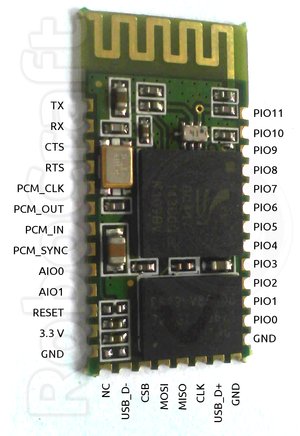
OpenSource Sensor Node firmware for BlueCore-based Bluetooth Modules

BlueCore4-Ext is a popular Bluetooth chip used in many Bluetooth modules, some priced below $10. The idea is to create Wireless Sensor/Control Network using this modules, as Bluetooth is really ubiquitous technology nowadays, so any smartphone can be used to provide user UI/control for such network. This is especially facilitated by the fact that BlueCore4-Ext is a SoC (system-on-chip) integrating microcontroller and peripherals in one package (small too), allowing it to be programmed with a user firmware for autonomous functioning with minimum of additional components. It even has built-in temperature sensor, so just add a battery and you have ready-made wireless temperature sensor (not too precise, granted, but you can calibrate it yourself ;-) ).

(Image by robocraft.ru)


BluTuNode is a firmware for such a Bluetooth Wireless Node, which allows to control it from a host over the air.

Source code: http://github.com/pfalcon/blutunode

Features implemented:
  • Full control of GPIO: input/output, configuring direction, pullups/pulldowns, etc.
  • Reading sampled from build ADCs.
  • Reading of temperature sensor.
  • Querying other system parameters.
  • Querying Bluetooth parameters.
  • Poll mode, when module automatically reads some sensor at specified period and sends information to host.
Features planned/ideas:
  • UART control (note that this is generally not a priority, because UART is mostly used to connect to host/microcontroller, and this firmware is designed for autonomous modules).
  • SPI/I2C/1-wire support to connect external sensors.
  • More Bluetooth-level information and control.
  • OpenSource tools to program/manage BlueCore modules.
  • Flash access/writing, over-the-air firmware updates.

Appendix:

Some technical characteristics of BC4-based module:

SoC: BC417 (BC417143B full model ID)
CPU: XAP2+, 16-bit RISC (no special 8-bit data support), Harward architecture, 64Kword data space, 1Mword+ code space
Flash: 1Mbyte (512Kwords, 75% typically occupied by Bluetooth stack/OS)
RAM: 24Kword
Execution environment: Virtual machine, no native hardware access (later versions of firmware OS support "native" mode, heavily bounds-checked still).

Thursday, March 29, 2012

Developing for TI LaunchPad MSP430 board on Ubuntu

If you google for it, you'll find quite a few blog posts, but most of them are from 2010. But starting with Ubuntu 11.10 (Oneiric), gcc-msp430 and friends are included in the main repositories, so you can just apt-get install them:

apt-get install binutils-msp430 gcc-msp430 \
    msp430-libc msp430mcu mspdebug

There's one annoying bug in Oneiric's version of binutils-msp430 which breaks build with -ffunction-sections -Wl,--gc-sections options (which is kinda common trick in embedded world to remove unused functions and reduce code size): mspgcc #3386145. It is fixed in Ubuntu 12.04 (Precise).

I'm however still running Maverick, so instead I downloaded following Oneiric packages:

binutils-msp430_2.21~msp20110421-2_i386.deb
gcc-msp430_4.5.3~mspgcc-4.5.2-20110612-1_i386.deb
libgmp10_5.0.1+dfsg-7ubuntu2_i386.deb
libmpc2_0.9-3_i386.deb
msp430-libc_20110612-1_i386.deb
mspdebug_0.16-1_i386.deb

Then few from Precise:
binutils-msp430_2.22~msp20110716p5-1_i386.deb
msp430mcu_20110613-3_all.deb

(If you try to install Precise versions of other packages on Maverick, they want to pull upgrades to system libs, which I wanted to avoid).

and installed them manually with dpkg.